

Description
Download ObscuraCam APK – privacy, anonymous, photo, video, face blur, location data, secure, Android app, protect identity, image anonymization, photo editing, digital privacy
Overview
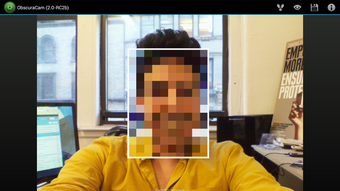
ObscuraCam is a privacy-focused multimedia tool designed to help users protect their identities when sharing photos and videos. Developed by The Guardian Project, the application enables individuals to anonymize visual content before distribution, ensuring that personal information remains concealed. It is particularly useful for journalists, activists, and everyday users concerned about digital privacy, especially in sensitive situations such as documenting protests or sharing personal moments with family.
The app automatically detects faces in both images and video clips, allowing for quick and efficient anonymization across large batches of content. It removes embedded metadata such as GPS coordinates, device model, and timestamps, which could otherwise expose the location or identity of the photographer. This feature is critical for users in high-risk environments where surveillance or data tracking poses a threat.
ObscuraCam supports multiple anonymization modes, including pixelation, complete face removal, and playful disguises like fake noses and glasses. These options provide flexibility depending on the user’s privacy needs and desired outcome. The application integrates with standard Android sharing functions, enabling direct posting to social media platforms like Facebook and Twitter without compromising privacy.
Key Features & Capabilities
- Automatic Face Detection – Identifies faces in photos and videos with minimal user input, streamlining the anonymization process.
- Multiple Anonymization Modes – Offers pixelation, full face removal, and fun disguises such as fake noses and glasses for varied privacy needs.
- Metadata Removal – Erases GPS location, device information, and timestamps from images before saving or sharing.
- Batch Processing Support – Allows users to anonymize multiple photos or videos at once, improving workflow efficiency.
- Secure Sharing Integration – Directly shares protected media to any Android app with a “Share” function, including social networks and messaging platforms.
- Targeted Blurring – Enables users to blur everything except a selected region, preserving visual context while protecting identities.
These features are especially valuable for users documenting human rights issues, capturing public events, or sharing personal media without revealing sensitive details. The ability to anonymize crowds or long video footage quickly makes ObscuraCam a practical solution for real-world privacy challenges.
User Interface, Workflow & Performance
The user interface of ObscuraCam is designed with simplicity and functionality in mind. The main screen provides quick access to photo and video selection, with intuitive controls for applying anonymization effects. Navigation is straightforward, allowing users to move between images, apply filters, and share content with minimal steps.
Workflow efficiency is enhanced by the app’s automatic face detection, which reduces manual intervention. Once a photo or video is loaded, users can choose a privacy mode and apply changes in seconds. The interface supports both touch and gesture-based interactions, ensuring accessibility across different device types.
Performance details were not specified by the developer. However, based on the app’s size of 10.2 MB and its focus on image processing, it is likely optimized for moderate hardware requirements. The developer did not provide additional system requirements, and exact performance behavior under various conditions remains unspecified.
Compatibility & System Requirements
ObscuraCam is designed for Android devices and is compatible with the Android operating system. The current version is 1.0.2, released on May 15, 2013. The application has a file size of 10.2 MB, indicating a lightweight footprint suitable for older or lower-end Android devices.
Exact system requirements were not listed by the developer. Compatibility information is limited to the OS platform and version. Users should ensure their device meets general Android app requirements to install and run the application. No specific CPU, RAM, or storage recommendations were provided.
Pros and Cons
Pros
- Free to download and use with no in-app purchases
- Strong focus on privacy with automatic face detection and metadata removal
- Supports multiple anonymization techniques for flexible use cases
- Lightweight at 10.2 MB, suitable for older Android devices
- Direct integration with Android sharing functions for seamless workflow
Cons
- Version 1.0.2 is outdated, with no recent updates since 2013
- Limited compatibility information and no official system requirements
- No support for iOS or other platforms
- Outdated interface may not align with modern Android design standards
- Limited documentation or user guides from the developer
FAQ Section
Is ObscuraCam safe to use on Android?
Yes, ObscuraCam is developed by The Guardian Project, a trusted organization focused on digital rights and privacy. The app removes sensitive metadata and anonymizes faces, reducing the risk of identity exposure when sharing media.
Can I use ObscuraCam on iOS devices?
Currently, ObscuraCam is only available for Android. There is no official version for iOS or other operating systems.
Does ObscuraCam require an internet connection?
No, the app functions entirely offline. It processes images and videos locally on the device without transmitting data to external servers.
How often does ObscuraCam receive updates?
The latest version available is 1.0.2, released in 2013. The developer has not released any updates since then, so the app is no longer actively maintained.
Is ObscuraCam free to download?
Yes, ObscuraCam is completely free to download and use. There are no premium features or subscription models.
Final Thoughts + CTA
ObscuraCam remains a pioneering tool in the realm of digital privacy, offering essential features for anonymizing photos and videos. While its outdated version and lack of recent updates raise concerns about long-term compatibility and security, the core functionality—face blurring, metadata removal, and secure sharing—remains relevant. It is particularly valuable for users in sensitive environments who prioritize privacy over modern design or frequent updates.
Despite its limitations, ObscuraCam continues to serve as a reliable option for those seeking a lightweight, free, and secure way to protect identities in visual content. For users on older Android devices or those needing basic anonymization without cost, it remains a practical choice.
Download ObscuraCam now
Guides & Tutorials for ObscuraCam APK
How to install ObscuraCam APK
- Click the Preview / Download button above.
- Once redirected, accept the terms and click Install.
- Wait for the ObscuraCam APK download to finish on your device.
How to use ObscuraCam APK
This software is primarily used for its core features described above. Open the app after installation to explore its capabilities.
User Reviews for ObscuraCam APK 0
No reviews found





